AppRequests is an independent mobile app comparison platform. We may earn a commission when you click through.
The Photo Restoration Apps Worth Keeping
Four Android and six iPhone picks cover scratches, blur, colorization, and recovery, but only some are built for true restoration.
Quick Picks for Different Restoration Jobs
Best overall for Android restoration: jpgHD: AI Photo Restore.
Best-rated iPhone pick with meaningful review volume: PhotoApp - AI Photo Enhancer.
Best for old family prints: Relumi: Restore Old Photos AI.
Best for deleted files rather than damaged photos: Photo Restore - Video & File.
This list is for people restoring family archives, not simply adding a filter to a new selfie. Generic app rankings blur together enhancement, colorization, animation, and file recovery. Those are different jobs. The community-requested picks below are separated by what they actually claim to repair, the platform they support, and the evidence available on their store pages.

For Scanned Prints, Scratches, and Faded Faces
The strongest cluster focuses on actual restoration: repairing visible damage, reducing blur, improving clarity, and adding color. That matters because an app that only recovers deleted files cannot rebuild a scratched print, while a colorizer may leave creases and noise untouched.
AI Photo Restore
jpgHD covers the broadest restoration brief in this group: scratches, faded family photos, blur, noise, colorization, and upscaling. The Android listing does not show a price or rating in the supplied data, so the feature list carries the recommendation rather than social proof. Compared with recovery tools, this is the right starting point for a damaged image that still exists. Best for Android users restoring mixed batches of prints, portraits, and artwork.

Relumi
Relumi is more explicitly aimed at family archives than general image polishing. Its listing names scanned prints, faded snapshots, damaged wedding photos, blurry pictures, and early digital images, then adds scratch repair, face unblurring, and black-and-white colorization. The claim that it has processed millions of photos is provider-supplied, not independent testing, so treat it as context rather than proof. Best for Android users with a shoebox of scanned family pictures and several types of damage to handle.

FixQ
FixQ takes a similar Android route but describes the repair targets more plainly: scratches, tears, creases, blur, faded areas, and black-and-white colorization. That makes it easier to match the app to a visibly damaged print. The listing says processing happens on the phone in seconds, but it provides no independent timing data, price, or rating here. Best for Android beginners who want a simple repair workflow for torn or creased family photos.

RetroFix
RetroFix is the focused iPad pick in this section, built around restoring old photos and converting black-and-white images to color. Its 4.7-star score looks promising, but it comes from only 15 ratings, far less evidence than PhotoApp's 5.6k ratings. The store page lists it as free with in-app purchases, so free installation should not be confused with unlimited restoration. Best for iPad owners testing color repair on a small personal archive.

These four apps are aimed at images that need reconstruction, not just sharpening. jpgHD has the widest stated toolkit, while Relumi and FixQ describe old-photo damage in the most concrete terms. RetroFix is attractive for iPad testing, but its tiny review sample makes the 4.7-star score less persuasive.
The practical insight is easy to miss: colorization is only one step. A faded print with scratches still needs repair and noise reduction, so an app advertising “black and white to color” alone may leave the hardest work unfinished.
iPhone Picks With More Visible Store Evidence
iPhone users get clearer public signals from the supplied App Store pages: ratings, review counts, platform limits, and the free-with-in-app-purchases model. That does not prove output quality, but a larger review base is more useful than a perfect score from a handful of users.
PhotoApp AI Photo Enhancer
PhotoApp has the strongest review evidence in this set: 4.6 stars from 5.6k ratings on the Pakistan App Store listing. It focuses on enhancement, unblurring, and fixing images rather than presenting itself solely as a historic-photo repair tool. The limitation is platform access: the listing says iPhone only, free with in-app purchases, and not verified for macOS. Best for iPhone users who want a broadly useful enhancer with more public feedback than the smaller apps here.

Pixelup - AI Photo Enhancer
Pixelup is another iPhone-only enhancer, with unblur, retouch, clear, and fix tools listed on its store page. Its 4.4-star score from 391 ratings is respectable but materially less established than PhotoApp's 4.6 from 5.6k. It is free to install with in-app purchases, so check the paywall before processing a large archive. Best for iPhone users who want restoration plus retouching rather than a narrowly archival workflow.

Photo Restore
Photo Restore: Clear Picture has a clean promise—AI enhancement and clearer old photos—but the available evidence is extremely thin: 5.0 stars from only 2 ratings. That score should not outrank apps with hundreds or thousands of ratings. The listing also says iPhone only and free with in-app purchases. Best for an iPhone user willing to run a small test image before trusting it with irreplaceable scans.

Oldfix
Oldfix has the same warning label as Photo Restore: Clear Picture, with a 5.0-star score based on just 5 ratings. Its title and listing clearly target old-photo restoration, and the store page shows free installation with in-app purchases, but there is not enough review volume to call the output proven. Best for iPhone users testing a newly listed restoration app on duplicate scans, not the only copy of a treasured photograph.
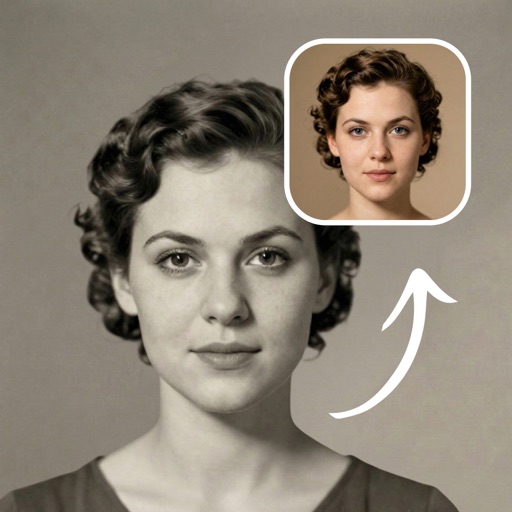
PhotoApp is the safest iPhone recommendation because its rating is backed by the largest review sample here. Pixelup is the more feature-oriented alternative for users who also want retouching. The two tiny-score apps may work, but their perfect ratings are not meaningful evidence yet.
A second useful reality check: every iPhone listing in this section is marked free with in-app purchases. “Free” means you can install it without paying upfront; it does not establish that full-resolution exports, unlimited jobs, or the best restoration model are included.

Do You Need Restoration or File Recovery?
This final pair is where many app lists go wrong. Restoring a damaged photo changes the image itself. Recovering a deleted file tries to find an existing file in device storage. One cannot substitute for the other.
Photo Restore
Photo Restore - Video & File is not a classic old-photo restoration app. Its listing describes scanning for accidentally deleted photos, videos, and other files, including JPEG and PNG recovery. That makes it useful after an accidental deletion, but it is the wrong pick for scratches, faded paper, tears, or black-and-white colorization. Best for Android users trying to recover deleted media before attempting any visual repair.

Restoria
Restoria goes beyond repair by advertising animation alongside restoration, enhancement, scratch removal, sharpening, and colorization. The animated-photo feature may appeal to people creating a short tribute from an old portrait, but it also moves the app away from strict archival restoration. No price, rating, or platform detail is included in the supplied listing data. Best for Android users who want to turn a restored family image into a short moving keepsake.

Use Photo Restore - Video & File only when the original file has disappeared. Use Restoria when the file exists and you want repair plus an animated result. Mixing those jobs is the fastest way to choose the wrong app.
Quick Comparison
| App | Platform shown | Best use | Store evidence |
|---|---|---|---|
| jpgHD | Android | Broad restoration and upscaling | Features listed; no supplied rating or price |
| PhotoApp | iPhone | Enhancement and unblurring | 4.6 stars, 5.6k ratings |
| Relumi | Android | Scanned family photos | Detailed restoration claims |
| RetroFix | iPad | Old-photo repair and colorization | 4.7 stars, 15 ratings |
| Pixelup | iPhone | Enhancement plus retouching | 4.4 stars, 391 ratings |
| Photo Restore - Video & File | Android | Deleted-file recovery | Recovery features listed |
What to Avoid Before Uploading Precious Photos
- Do not treat a perfect score as proof. Oldfix has 5.0 stars from 5 ratings, and Photo Restore: Clear Picture has 5.0 from 2. Tiny samples can swing wildly.
- Do not confuse free installation with free restoration. PhotoApp, RetroFix, Pixelup, Photo Restore: Clear Picture, and Oldfix are listed as free with in-app purchases.
- Do not expect AI to recover missing history. Colorization invents plausible color, and face repair can invent facial detail. Keep the untouched scan.
- Do not use a recovery app for physical damage. Photo Restore - Video & File searches for deleted files; it does not repair scratches or faded paper.
- Do not upload the only copy first. Duplicate the scan and compare the result at full size before processing an archive.
The community-requested shortlist is strongest when matched to the job: jpgHD or Relumi for broad Android restoration, PhotoApp for iPhone users who value review volume, RetroFix for a small iPad test, and Photo Restore - Video & File only for deleted media. Restoria earns a place for animation, but that is a creative extra rather than proof of better archival repair.
Once your restored images are ready, the same demand-first approach helps with other app categories too. For a different kind of community-tested shortlist, read The Gaming Boosters Players Actually Requested.